
API reference
Assemblic provides a powerful, standardised API to interact with your OpenFisca rules. This allows you to build calculators, web forms, and backend integrations that rely on your single source of truth.
Authentication
To access the API, you must authenticate using an Access Token, unless you have specifically configured your project to be public (unprotected).
Managing Tokens
- Go to Access Tokens in the dashboard.
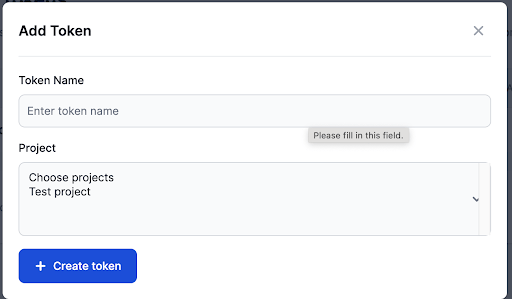
- Click New Token to generate a secure key.
- Enter a name for the token.
- Select the token expiry. The token will automatically stop working after this time period, but will still be visible via this page.
- Select the project(s) the token will be associated with.
- Click Create Token.
- Store this token securely. It will only be shown once.
If a token is compromised, you can:
- Revoke: Immediately disable the token.
- Regenerate: Create a new token string for the existing entry (requires updating all client systems using this token).
API Endpoints
The OpenFisca API
Your project’s API is fully compliant with the OpenFisca Web API specification.
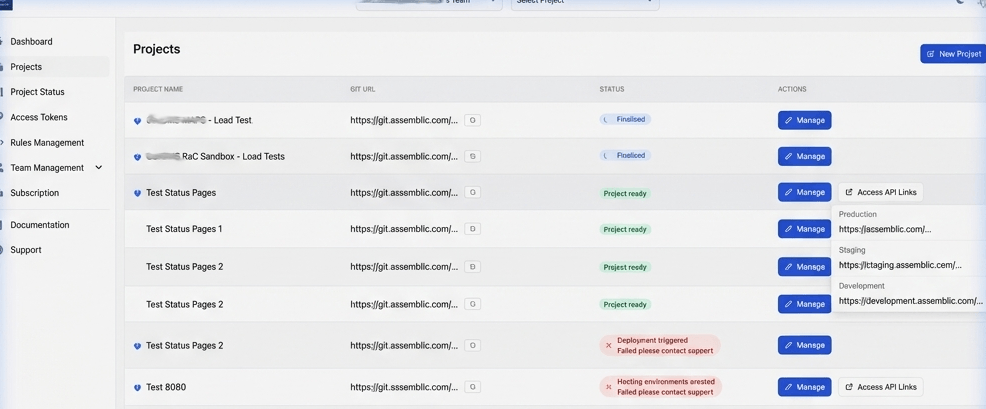
Base URLs & Environments: Assemblic provides unique, dedicated endpoints for your Production, Staging, and Development environments, corresponding to your main, stage, and develop branches respectively.
To find your exact API base URLs:
- Go to the Projects list.
- Click the Access API Links dropdown button directly on the project’s row.
- Select the desired environment (Production, Staging, Development) from the dropdown list.
Common Operations
/entities: List the entities defined in your project./parameters: Query the parameters of your tax and benefit system./calculate: The core endpoint. Send a JSON payload describing a situation (entities + variables) and receive the calculated results.
Example Request
Here is a basic curl example demonstrating how to hit your project’s calculate endpoint using your access token. Replace the URL with the specific environment URL copied from your dashboard.
curl -X POST https://api.assemblic.com/v1/projects/<project-id>/calculate \
  -H "Authorization: Bearer <your-access-token>" \
  -H "Content-Type: application/json" \
  -d '{
    "persons": {
      "person1": {
        "salary": { "2023-01": 50000 }
      }
    }
  }'